Showing posts with label Utility. Show all posts

Saturday, May 26, 2012

Game Booster 3.5 Beta


Turn off a lot of features, To speed up your Game!
    + Higher FPS and less lags
+ Added video recording function when playing 3D games
+ Added screenshot capture function when playing 3D games
+ Added voice recording function when playing games
+ Added more supported languages
+ Fixed bugs in the previous version


dzakwanA__gamer

Folder Protect 1.9.3

Folder Protect 1.9.3
Folder Protect 1.9.3 | 3.55MB
Folder Protect is a tool used to provide security of important files, folders, drives, and your program. You can choose whether you want to write protection, remove protection, access to protect or hide your data. The program can work in Safe Mode, stealth mode and hotkeys, and auto-protection of the password prompt to access the protected items.
Features:
  • Block access to your files
    You can block unauthorized access to files, folders, drives and programs.
  • Hide your data from other users
    You can hide all your personal data and professional documents and information with Folder Protect. Only you can access hidden files and folders by typing the exact path in Windows Explorer, or by using the RUN command DOS.
  • Do not Allow Anyone to modify your file
    You can create your file is protected with the write-protect folders and protect them from change, so no one can make changes in it.
  • Protect your data from deletion
    You can share data with others without fear of removal or loss of data
  • Protect files in Safe Mode
    You can protect data in the Safe Mode. It features an unparalleled and ensures maximum protection of your data.
more detail visit: http://newsoftwares.net/
 
Password Link
freesoft88
dzakwanA__gamer

Monday, May 21, 2012

Windows 7 Logon Screen Tweaker 1.5 Full version

If my friend bored with the look of windows 7 logon that's all .. There is no harm if my friend tampilanya with software replacing  Windows 7 Logon Screen Tweaker 1.5 Full version, with the affairs of this software to replace windows 7 Logon background can be done very easily .. pal can replace with any background to suit the tastes of our computer displays look more attractive .. So .. if my friend wanted to try it .. please download ... Screen Shoot:


Windows 7 logon Screen Tweaker 1.5 Full version 2 MB
Click Image to Zoom


(Mediafire 2 MB)
dzakwanA__gamer

Monday, May 7, 2012

Windows 8 transformation pack 2

Windows 8 transformation pack changes the user interface of your current operating system to match the style of Windows 8. If you have not yet downloaded Windows 8, you can use these transformation packs to convert the look of Windows 7, Vista and even XP into Windows 8.
windows8 transformation pack
Transformation pack only changes the look and feel of your current OS and not the whole operating system. Windows 8 transformation pack consists of several tools to convert virtually any version of Windows, i.e XP, vista, 7 into Windows 8. It changes everything including icons, Start Menu, themes and wallpapers. Also, it brings a new logon screen plus pre-configured gadgets for Windows 8's Metro UI.
windows8 converted UI
Features of Windows 8 Transformation Pack
Windows 8 transformation pack will convert any windows platforms, like windows xp, vista, 7 virtually to Windows 8.
Experience most features of Windows 8 UI without installing Windows 8.
Transformation pack changes icons, toolbars, skins ,themes and other enhancements to match Win 8.
Backup and restore option to be more secure and reliable.
Checkout the screenshot of Windows 7 transformed to Windows 8.
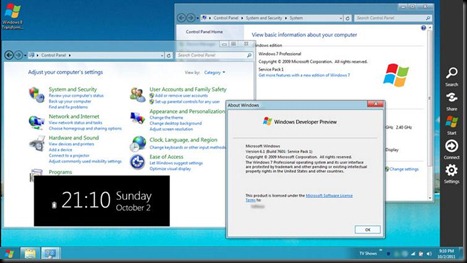
win7 transformed to win8
Here are some screenshots of the Win8 Transformation pack
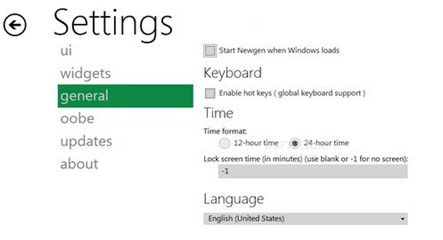
UI settings
windows8 transformation pack settings
General Settings
transformation pack settings
Requirements of Windows 8 transformation pack 2.0
· NET Framework 2.0  - Required for system files transformation in Windows XP/Server 2003 x64 Editions.
· NET Framework 4.0 - Required for Windows 8 features like User Tile/Metro UI Desktop/Auto-colorization.
Download 
  
  [Size: 58.3 MB | Release Date: 2-Oct-2011]
dzakwanA__gamer

Friday, May 4, 2012

Deep Freeze Standard 7.3 + Serial


Faronics Deep Freeze helps eliminate computer downtime and damage by making computer configurations and settings indestructible. Once installed on your computer, any changes made while in session, whether accidental or malicious, are never permanent! Whether it’s the inevitable drift of your configuration settings, accidental misconfiguration or even malicious software, Deep Freeze gives you back your computer’s original condition every time you restart your machine.

  • Complete workstation recovery on restart
  • Password protected
  • Windows 7, Vista, XP and 2000
  • Mac OSX
  • Supports Multiple Hard Drives (FAT, FAT32, NTFS, basic and dynamic disks)
  • Supports Multi-Boot Environments

Download :


Installer + Serial :

Deep Freeze Standard 7.3 + Serial Via MF (4 MB)
Password : dhizka


Serial Only :


Serial Deep Freeze Standard 7.3 Via Ziddu (1 KB)
dzakwanA__gamer
powered by
Socialbar
Configuration After installing, you might want to change these default settings: